🐦 Flick Bird — Motion-Controlled Retro Flappy Game
Flick a breadboard to make the bird flap.
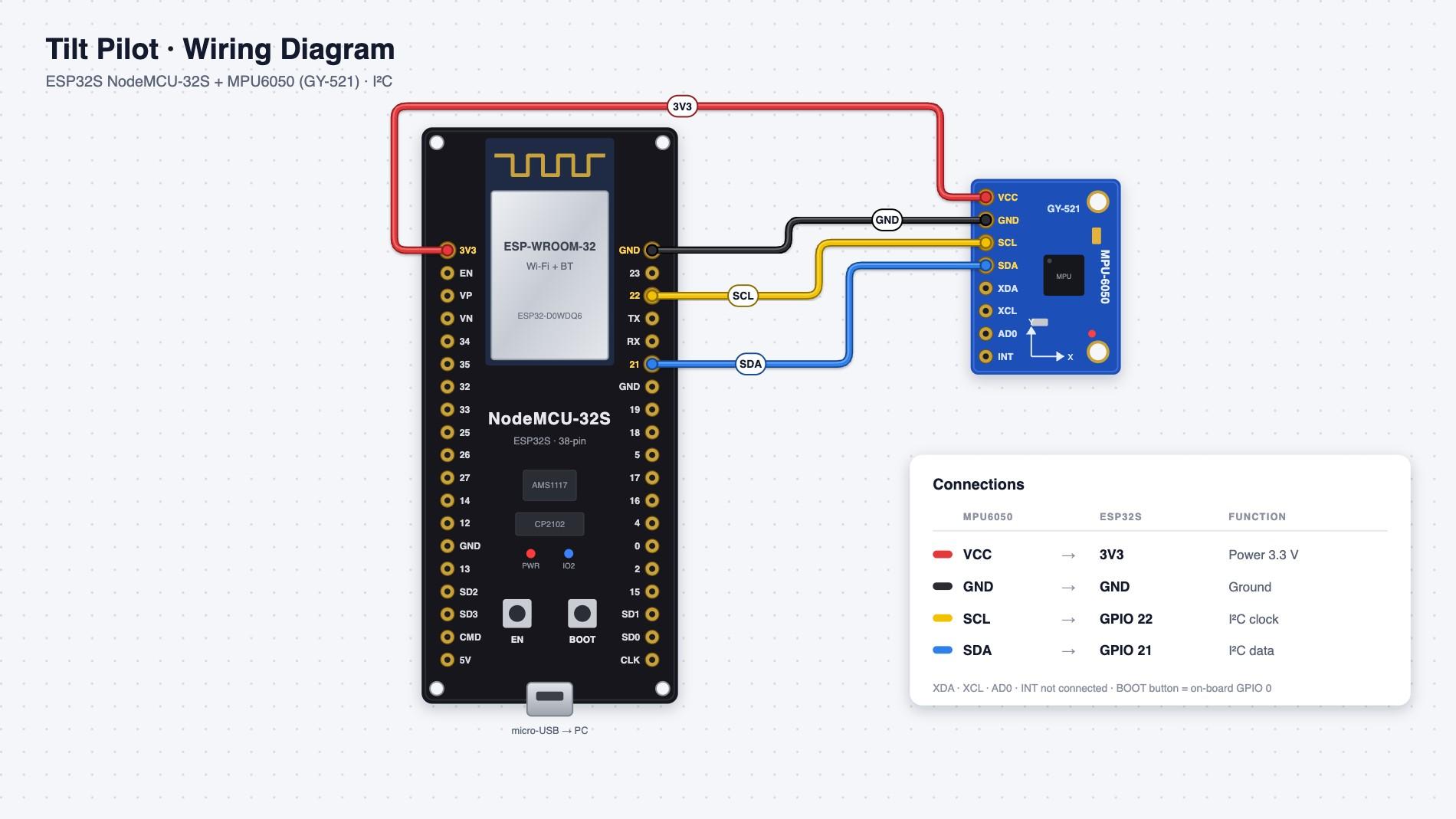
An ESP32S reads an MPU6050 motion sensor and sends every movement to a browser game over USB.
A quick flick upward makes the bird flap. There are no buttons and no joystick, just motion.
📌 Overview
| | |
|---|---|
| Microcontroller | ESP32S (NodeMCU-32S, 38-pin) |
| Sensor | MPU6050 6-axis gyro + accelerometer (GY-521 module) |
| Connection | USB serial at 115200 baud, read in Chrome with the Web Serial API |
| Game | Single HTML file: retro pixel-art flappy game written in JavaScript |
| Controls | Flick up to flap (or tilt mode), BOOT button, keyboard fallback |
| Update rate | 100 sensor readings per second |
| Cost | About $3–5 in parts |
How it works in one line:MPU6050 → (I²C) → ESP32S → (USB serial) → Chrome (Web Serial) → gesture detection → flap!
✨ Features
🎮 Flick-to-flap: a quick upward flick of the board = one flap
🎯 One flap per gesture: slow tilts and downward flicks are ignored
🕹️ (default) or
Hardware Required
ESP32
Two control modes:
Flick up
Tilt up
📊 Live calibration meter: see how hard you flick and set the sensitivity
🖥️ True full screen: no browser tabs or address bar, and the UI hides while you play
👾 Retro pixel art: crisp at any screen size, with original sprites drawn in code
🔊 Retro sound effects: generated live, no audio files
🏆 Best score saved in the browser
⌨️ Keyboard / mouse fallback: playable without the board
🧰 Components
| Qty | Part | Notes |
|---|---|---|
| 1 | ESP32S NodeMCU-32S | Any 38-pin ESP32 dev board with the same pinout works |
| 1 | MPU6050 module (GY-521) | Gyroscope + accelerometer breakout |
| 1 | Breadboard | Half-size fits nicely in your hand |
| 4 | Jumper wires | Red, black, yellow, blue |
| 1 | Micro-USB data cable | Charge-only cables won't work |
Open Boards Manager, search esp32 and install esp32 by Espressif Systems.
Select Tools → Board → NodeMCU-32S (or ESP32 Dev Module).
Select the right Port. If none appears, install the CP210x USB driver.
3. Upload the firmware
Open flick_bird_controller/flick_bird_controller.ino.
Click Upload. No extra libraries are needed.
Optional: in the Serial Monitor at 115200 baud you should see:
READY
T,0.52,-1.13
T,0.55,-1.10
Close the Serial Monitor, because it blocks the game from using the port.
4. Play
Open flick_bird_classic.html in Chrome or Edge on a computer.
Click Connect controller and pick the ESP32's port.
Hold the board still for about 1 second while the gyro calibrates.
Press Space or click Play. The game goes full screen.
Flick the board's nose up to flap! 🐦
🎮 Controls
| Action | Breadboard | Keyboard / mouse |
|---|---|---|
| Flap | Quick flick up | Space, ↑, W or click |
| Start / retry | Flick or BOOT | Space, Enter or click |
| Full screen | — | F |
| Pause | — | P |
| Mute | — | M |
| Re-centre (tilt mode) | — | C |
Browsers only allow full screen from a key press or click. If you start with a flick or the BOOT button, press F once and it stays full screen.
Game rules
Fly through the gaps between the pipes.
Each pipe you pass = +1 point.
Touching a pipe or the ground ends the run.
Your best score is saved automatically.
⚙️ How It Works
1. Firmware: reading the motion
The ESP32 talks to the MPU6050 directly over I²C (no libraries) and calculates the board's angle 100 times a second.
// Wake the sensor and set it up
writeReg(0x6B, 0x01);   // wake up, use gyro clock
writeReg(0x1A, 0x03);   // low-pass filter ~44 Hz
writeReg(0x1B, 0x08);   // gyro range ±500 °/s
writeReg(0x1C, 0x00);   // accel range ±2 g

// Every 10 ms: read gyro + accelerometer, fuse them
roll  = 0.98 * (roll  + gyroX * dt) + 0.02 * accRoll;
pitch = 0.98 * (pitch + gyroY * dt) + 0.02 * accPitch;

// Send to the PC
Serial.printf("T,%.2f,%.2f\n", roll, pitch);
Why mix gyro and accelerometer (complementary filter)?
The gyro is fast and smooth but slowly drifts.
The accelerometer always knows where "down" is, but it's noisy.
98% gyro + 2% accelerometer gives a reading that is fast, smooth and drift-free.
Serial messages
| Message | Meaning |
|---|---|
| T,<roll>,<pitch> | Board angles in degrees, 100× per second |
| BTN | BOOT button pressed |
| READY | Sensor found and calibrated |
| ERR,<message> | Sensor not found; the firmware retries every second |
2. Game: turning motion into a flap
The browser reads the serial lines and works out how fast the board is rotating:
// angular speed in degrees per second
const raw = (angle - previousAngle) / 0.01;     // samples are 10 ms apart
rate += (raw - rate) * 0.5;                      // light smoothing
Flick mode (default)
if (armed && rate > 150) {        // fast upward flick
  flap();
  armed = false;                  // one flap per flick
}
if (!armed && rate < 45) {        // board has slowed down again
  armed = true;                   // ready for the next flick
}
Slow tilts never reach 150 °/s, so they don't flap.
Downward flicks give a negative rate, so they don't flap either.
There is a 140 ms cooldown, so one flick can't double-flap.
Tilt mode
Raise the nose past 15° = one flap.
Lower it back below 7.5° to arm the next one.
3. Rendering: crisp pixel art
The game world is only 256 pixels tall, drawn on a tiny hidden canvas.
It is then scaled up to full screen with nearest-neighbour scaling, so every pixel stays sharp on any monitor.
All sprites (bird, pipes, clouds, hills, ground, font) are generated in code, with no image files.
Physics runs at a fixed 120 updates per second, so the game feels the same on every screen.
🎛️ Settings
| Setting | Default | What it does |
|---|---|---|
| Flap gesture | Flick up | Flick up or Tilt up |
| Flick strength needed | 150 °/s | Lower = easier to flap |
| Tilt needed | 15° | For tilt mode |
| Use the other axis | Off | If flicking up does nothing |
| Invert direction | Off | If flicking down flaps instead of up |
Calibrate in 10 seconds: open Settings and flick the board up. The bar should jump past the gold line and flash. Lower the slider if flicks are missed, or raise it if the bird flaps on its own.
🧯 Troubleshooting
| Problem | Fix |
|---|---|
| ERR,MPU6050 not found | Check VCC → 3V3, GND → GND, SDA → 21, SCL → 22. Push the jumpers in firmly. |
| No port in the Arduino IDE | Use a data cable and install the CP210x driver. |
| "Could not open the port" | Close the Arduino Serial Monitor. |
| Connect button does nothing | Use Chrome or Edge on a computer. Safari and Firefox don't support Web Serial. |
| Flicking up doesn't flap | Turn on Use the other axis, or Invert direction. |
| Bird flaps by itself | Raise Flick strength needed in Settings. |
| Flicks get missed | Lower Flick strength needed, and flick sharply rather than slowly. |
| Upload fails ("Failed to connect") | Hold BOOT while the IDE says Connecting…. |