✈️ Tilt Pilot — Motion-Controlled 3D Flight Game
Fly a plane through a 3D city by tilting a breadboard. An ESP32S reads an MPU6050 motion sensor and streams its tilt to a browser game over USB. No joystick and no extra apps: just a microcontroller, one sensor and a web page.
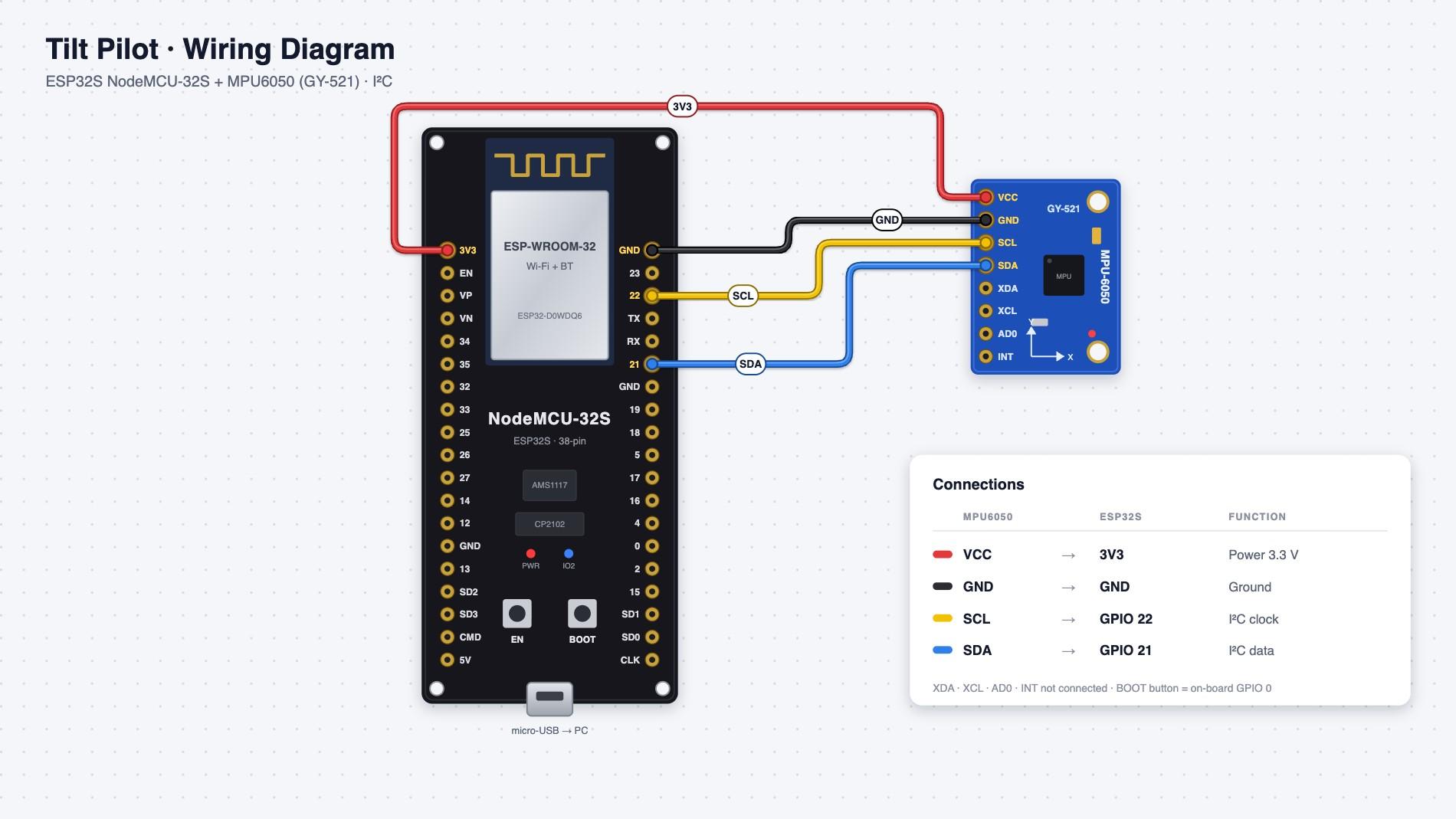
Wiring diagram
📌 Overview
Microcontroller ESP32S (NodeMCU-32S, 38-pin)
Sensor MPU6050 6-axis gyro + accelerometer (GY-521 module)
Link to PC USB serial at 115200 baud, read with the Web Serial API
Game A single HTML file: 3D city built with three.js, runs in Chrome or Edge
Update rate 100 tilt readings per second
Cost About $3–5 in parts
How it works in one line: MPU6050 → (I²C) → ESP32S → (USB serial) → Chrome (Web Serial) → 3D game
🧰 Components
Qty Part Notes
1 ESP32S NodeMCU-32S Any 38-pin ESP32 dev board with the same pinout works
1 MPU6050 module (GY-521) 3.3 V–5 V tolerant breakout
1 Breadboard A half-size board fits in your hand
4 Jumper wires Red, black, yellow and blue keep it easy to follow
1 Micro-USB data cable Must be a data cable, not charge-only
🔌 Wiring
MPU6050 pin ESP32S pin Wire colour Purpose
VCC 3V3 🔴 Red Power (3.3 V)
GND GND ⚫ Black Ground
SCL GPIO 22 🟡 Yellow I²C clock
SDA GPIO 21 🔵 Blue I²C data
XDA, XCL, AD0, INT — — Leave unconnected
text
ESP32S NodeMCU-32S MPU6050 (GY-521)
┌───────────────────┐ ┌──────────────┐
│ 3V3 ●─────────────┼──── red ───────►│● VCC │
│ │ │ │
│ GND ●─┼──── black ─────►│● GND │
│ GPIO 22 ●─┼──── yellow ────►│● SCL │
│ GPIO 21 ●─┼──── blue ──────►│● SDA │
│ │ │○ XDA (n/c) │
│ [EN] [BOOT] │ │○ XCL (n/c) │
│ └─ BOOT = start / re-centre │○ AD0 (n/c) │
└────────┬──────────┘ │○ INT (n/c) │
│ micro-USB → PC └──────────────┘
Tip: Power the MPU6050 from 3V3, not 5V, so the I²C lines stay at 3.3 V logic for the ESP32. The on-board BOOT button (GPIO 0) is used as the game button, so no extra button is needed.
🛠️ Making Process
Build the circuit
Push the ESP32S into the breadboard so it straddles the centre gap.
Place the MPU6050 at the top of the breadboard, header pins facing the ESP32.
Connect the four wires from the table above.
Double-check SDA → 21 and SCL → 22. Swapping these is the most common mistake.
Hardware Required
ESP32
Set up the Arduino IDE
Install the Arduino IDE (2.x).
Open File → Preferences and add this to Additional Boards Manager URLs:
text
https://espressif.github.io/arduino-esp32/package_esp32_index.json
Open Tools → Board → Boards Manager, search esp32 and install esp32 by Espressif Systems.
Select Tools → Board → ESP32 Arduino → NodeMCU-32S (or ESP32 Dev Module).
Select the correct Port. If no port shows up, install the CP210x USB driver.
Upload the firmware
Open tilt_pilot_controller/tilt_pilot_controller.ino.
Click Upload. No extra libraries are needed, because the sketch talks to the MPU6050 directly with Wire.h.
Optional: open the Serial Monitor at 115200 baud. You should see:
text
READY
T,0.52,-1.13
T,0.55,-1.10
...
Close the Serial Monitor before playing. It locks the USB port.
Play the game
Open tilt_pilot.html in Chrome or Edge on a laptop or desktop.
Click Connect and choose the ESP32's port.
Hold the board level and still for about 1 second while the gyro calibrates.
Press Enter (or BOOT on the board) to take off. The game goes full screen.
🎮 Controls
Action Breadboard Keyboard
Bank left / right Tilt left / right ← → or A D
Climb / dive Nose up / nose down ↑ ↓ or W S
Start / restart BOOT button Enter
Re-centre (set "level") BOOT while flying C
Pause — P
Full screen — F
Mute — M
Game rules
Fly through 30 rings before the timer runs out (60 s start, +5 s per ring).
Quick consecutive rings build a combo multiplier up to ×5.
Flying close to buildings earns proximity bonus points.
Hitting a building costs 1 of 3 lives.
Time left at the finish is added as a bonus.
⚙️ How the Code Works
Firmware (tilt_pilot_controller.ino)
cpp
// 1. Wake the MPU6050 and configure it
writeReg(0x6B, 0x01); // wake up, use gyro clock
writeReg(0x1A, 0x03); // digital low-pass filter ~44 Hz
writeReg(0x1B, 0x08); // gyro range ±500 °/s
writeReg(0x1C, 0x00); // accel range ±2 g
// 2. Calibrate: average ~400 gyro readings while the board is still
gyroBiasX = sumX / samples;
// 3. Every 10 ms: read accel + gyro in one 14-byte burst
readMotion(ax, ay, az, gx, gy, gz);
// 5. Send to the PC
Serial.printf("T,%.2f,%.2f\n", roll, pitch);
Why a complementary filter?
The gyroscope is smooth and fast, but slowly drifts over time.
The accelerometer always knows where "down" is, but it is noisy.
Mixing 98% gyro with 2% accelerometer gives a reading that is fast, smooth and doesn't drift.
Serial protocol
Message Meaning
T,<roll>,<pitch> Tilt angles in degrees, 100× per second
BTN BOOT button pressed
READY Sensor found and calibrated
ERR,<message> Sensor missing; the firmware retries every second
The firmware also detects a loose wire. If the sensor stops answering, it reports ERR and reconnects automatically once the wire is fixed.
Game (tilt_pilot.html)
js
// Read lines from the ESP32 with the Web Serial API
const port = await navigator.serial.requestPort();
await port.open({ baudRate: 115200 });
// "T,12.40,-3.10" -> roll / pitch input between -1 and +1
input.roll = clamp((roll - zeroRoll) / 35, -1, 1);
input.pitch = clamp((pitch - zeroPitch) / 35, -1, 1);
// Flight model: bank turns the plane, pitch climbs or dives
yaw -= bank * TURN_RATE * dt;
pos += forward * speed * dt;
City: generated endlessly around the plane. Buildings, roads and windows are drawn with custom shaders for good performance.
Collisions: checked against the same building data used for drawing, so what you see is what you hit.
Re-centring: whatever pose you hold when you press BOOT or C becomes "level".
Settings are saved in the browser, so you only set them once.
🎛️ Settings (in-game)
Setting Default What it does
Swap roll and pitch On For an MPU6050 mounted 90° rotated on the breadboard
Invert left / right Off Flip the bank direction
Invert up / down Off Flip climb and dive
Tilt for full deflection 35° Lower = more sensitive
Flight speed 120% 80–180%
Up / down strength 150% How steep and fast the plane climbs or dives
The live dot in Settings shows your tilt. It should move right when you tilt right, and up when you raise the nose. If it doesn't, use the swap and invert switches.
🧯 Troubleshooting
Problem Fix
ERR,MPU6050 not found Check VCC → 3V3, GND → GND, SDA → 21, SCL → 22. Push the jumpers in firmly.
No port in the Arduino IDE Use a data USB cable and install the CP210x driver.
"Could not open the port" in the game Close the Arduino Serial Monitor or any other app using the port.
Connect button does nothing Use Chrome or Edge on a computer. Safari and Firefox don't support Web Serial.
Plane slowly turns on its own Hold the board level and press BOOT or C to re-centre.
Directions are swapped or reversed Use Swap and Invert in Settings.
Upload fails with "Failed to connect" Hold BOOT while the IDE says Connecting…, then release.
Game is black or blank The page needs internet the first time it opens, to load three.js.
📁 Project Structure
text
tilt-pilot/
├── tilt_pilot_controller/
│ └── tilt_pilot_controller.ino # ESP32S firmware
├── tilt_pilot.html # 3D flight game (open in Chrome / Edge)
├── tilt_pilot_wiring.png # Wiring diagram
├── tilt_pilot_wiring.svg # Wiring diagram (vector)
└── README.md
🚀 Ideas to Extend
Wireless: send the tilt over Wi-Fi or Bluetooth, so the controller runs on a LiPo battery with no cable.
Throttle: add a potentiometer on an analog pin to control speed.
Rudder: use the gyro's Z axis to yaw with a twist of the wrist.
Haptics: add a small vibration motor that buzzes on near-misses and crashes.
3D-printed shell: turn the breadboard into a proper handheld controller.
Other games: the same T,roll,pitch stream can drive a racing game, a marble maze or a space shooter.
🧠 What You'll Learn
Reading a sensor over I²C by writing directly to its registers
Sensor fusion with a complementary filter
Talking from a microcontroller to a web page with the Web Serial API
Building a real-time 3D game in the browser with three.js