The offline Chrome dino game, rebuilt as a real handheld gadget.
Everyone knows the little dinosaur that shows up when your internet goes down. In this project, we bring it to life on an ESP32-S3 with a 0.96" OLED display. Tap the touch sensor to jump, dodge cactus clusters, and chase your high score while a buzzer plays the classic beeps.
It's a perfect project for learning how real games work on a microcontroller: game loops, physics, sprite graphics, collision detection and input handling, all on a 128×64 pixel screen.
✨ Features
Smooth running animation: the dino has two-frame running legs, a jump pose and a dead pose when you crash.
Chrome-style obstacles: cacti come in random groups of 1, 2 or 3, mixing small and large ones.
Increasing difficulty: the speed keeps rising and the gaps between cacti get tighter the longer you survive.
Hold-to-jump control: a quick tap gives a short hop, and holding gives a full jump, just like the original.
Permanent high score: your best run is saved in the ESP32's flash memory, so it survives power-off.
Night mode: the screen inverts every 700 points, like Chrome's day/night switch.
Hardware Required
ESP32S3
Sound effects: separate sounds for jumping, every 100-point milestone, and crashing.
Milestone blink: the score blinks every 100 points, just like Chrome.
Living background: the ground scrolls with random pebbles, and clouds drift slowly past.
Fair gameplay: every gap between cacti is calculated so it can always be cleared, so the game never gives you an impossible jump.
🧰 Components Required
| Component | Quantity | Notes |
|---|---|---|
| ESP32-S3 Dev Board | 1 | ESP32-S3-DevKitC-1 or any S3 board |
| 0.96" OLED Display (SSD1306, I2C, 128×64) | 1 | 4-pin version (VCC, GND, SCL, SDA) |
| TTP223 Capacitive Touch Sensor | 1 | Small square touch module |
| Passive Buzzer | 1 | Passive buzzer recommended for real tones |
| Breadboard | 1 | Full or half size |
| Jumper Wires | ~10 | Male-to-male or male-to-female |
| USB Cable | 1 | Must be a data cable, not charge-only |
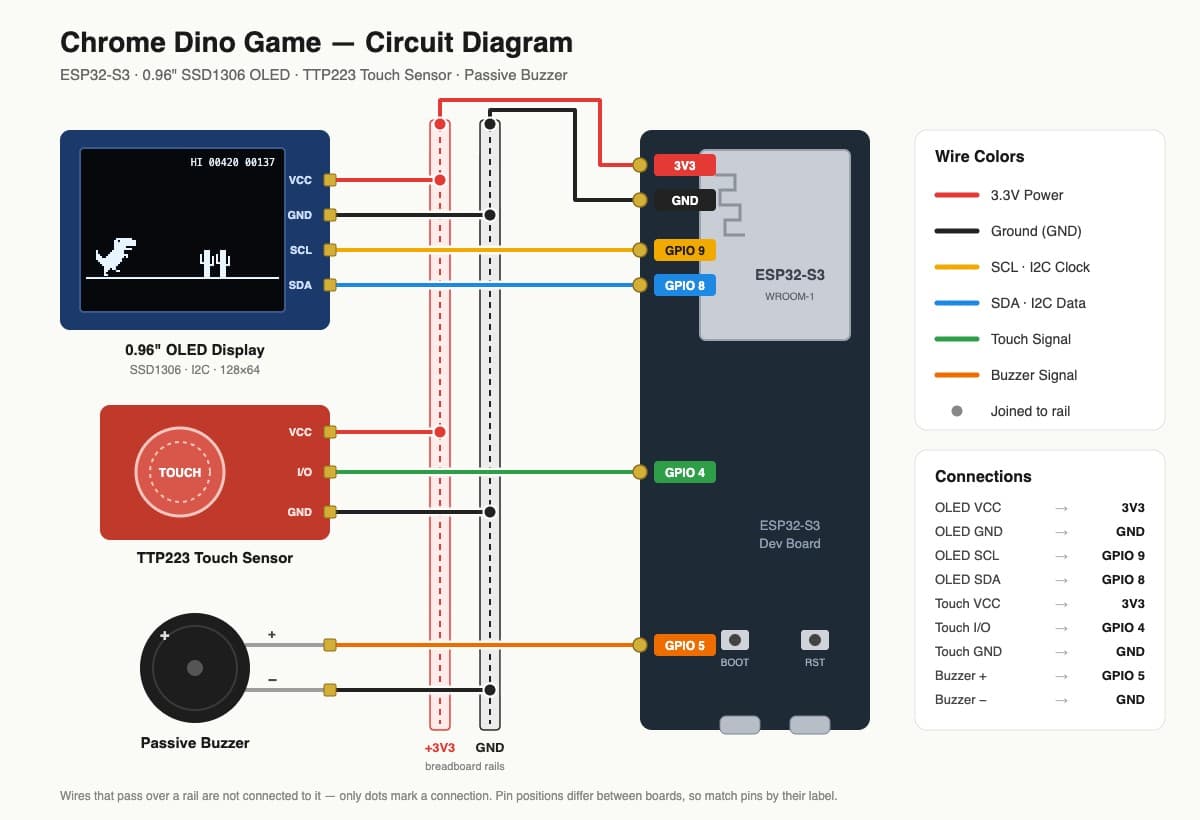
Power tip: connect the ESP32's 3V3 and GND pins to the breadboard's power rails first. Then connect every module's VCC and GND to those rails. This keeps the wiring clean and easy to check.
🛠️ Step-by-Step Build Guide
Step 1: Place the ESP32-S3 on the breadboard
Put the ESP32-S3 across the middle gap of the breadboard so the pins on each side sit in separate rows.
Step 2: Set up the power rails
Connect 3V3 → breadboard red (+) rail.
Connect GND → breadboard blue (−) rail.
Step 3: Connect the OLED display
VCC → red rail (3.3V)
GND → blue rail (GND)
SDA → GPIO 8
SCL → GPIO 9
Step 4: Connect the TTP223 touch sensor
VCC → red rail (3.3V)
GND → blue rail (GND)
SIG (sometimes labelled I/O or OUT) → GPIO 4
Step 5: Connect the buzzer
Positive (+, longer leg) → GPIO 5
Negative (−, shorter leg) → blue rail (GND)
Step 6: Double-check everything
Before plugging in USB, check every wire against the pin table. Most problems come from a single wire in the wrong hole.
💻 Software Setup
1. Install the ESP32 board package
Open Arduino IDE.
Go to File → Preferences.
In "Additional Boards Manager URLs", add:
https://espressif.github.io/arduino-esp32/package_esp32_index.json
Go to Tools → Board → Boards Manager, search esp32, and install esp32 by Espressif Systems.
2. Install the libraries
Go to Sketch → Include Library → Manage Libraries and install:
| Setting | Value |
|---|---|
| Board | ESP32S3 Dev Module |
| USB CDC On Boot | Enabled (needed for Serial Monitor over USB) |
| Upload Speed | 921600 |
| Port | The COM port of your ESP32-S3 |
4. Upload the code
Save the sketch as dino_game.ino inside a folder named dino_game.
Click Upload.
If the upload gets stuck at "Connecting...", hold the BOOT button until it starts uploading.
After uploading, press the RESET (RST) button once.
🎮 How to Play
On power-up, you'll see the DINO RUN start screen with "tap to start" blinking.
Tap the touch sensor to start. The dino jumps immediately, just like Chrome.
Quick tap = small hop. Hold = full high jump.
Jump over the cactus groups. The game gets faster the longer you survive.
Every 100 points, the score blinks and a beep plays.
At 700 points, the screen flips into night mode.
When you crash, GAME OVER appears with a crash sound. Tap again to retry.
Your HI score is shown in the top right and stays saved even after you unplug the device.
⚙️ How It Works
The game loop
The ESP32-S3 runs the game at about 30 frames per second. Every frame, it does the same five things:
Reads input: checks whether the touch sensor is pressed.
Updates physics: applies gravity to the dino and moves it up or down.
Moves the world: shifts the cacti, ground and clouds to the left.
Checks collisions: tests whether the dino overlaps any cactus.
Draws the frame: clears the screen, draws everything, and sends it to the OLED.
Jump physics
When you tap, the dino gets an upward speed. Every frame, gravity pulls that speed down until the dino lands. If you release the sensor early, the upward speed is cut short, which creates the small-hop effect.
Pixel-art sprites
Every sprite (the dino, the cacti, the clouds) is stored as a grid of # and . characters, where # means a lit pixel. This makes the graphics easy to read and easy to redesign.
Smart collision detection
The dino uses two hitboxes, one for its head and one for its body, instead of one big rectangle. This means near-misses feel fair, just like the original game.
Fair difficulty
The distance between cactus groups is calculated from the current speed. As the game speeds up, the gaps scale with it, so every gap is always possible to clear.
Saved high score
The high score is stored using the ESP32's Preferences library, which writes to flash memory. It only writes when you beat your record, which protects the flash from wearing out.
⚠️ Common Beginner Mistakes (and How to Fix Them)
1. OLED shows nothing (blank screen)
SDA and SCL swapped: this is the most common mistake. SDA must go to GPIO 8 and SCL to GPIO 9.
Wrong I2C address: most modules use 0x3C, but some use 0x3D. Change OLED_ADDR in the code.
Loose wire: cheap jumper wires often have poor contact. Press them in firmly or swap them.
2. OLED shows random noise or garbage
You probably have a 1.3" OLED with the SH1106 chip, not SSD1306. They look identical but need a different library (Adafruit_SH110X). Check the product listing for the chip name.
3. Buzzer makes no sound, or just a click
Wrong buzzer type: a passive buzzer needs tones from the code, while an active buzzer beeps by itself when powered. If yours is active, set ACTIVE_BUZZER to 1 in the code.
How to tell them apart: connect the buzzer directly to 3.3V and GND. If it beeps, it's active. If it's silent, it's passive.
Reversed polarity: the longer leg (+) goes to GPIO 5.
4. Touch sensor doesn't respond, or acts strangely
Touching it during power-up: the TTP223 calibrates itself in the first moment after power-on. If your finger is on it, it learns the wrong baseline. Keep hands off while powering up.
Toggle mode enabled: the TTP223 has two small solder pads labelled A and B on the back. If pad B is bridged, the sensor works in toggle mode and hold-to-jump breaks. Keep both pads open.
Thick covering: the sensor can work through thin plastic or acrylic, but thick material or metal will block it.
5. Upload fails or gets stuck at "Connecting..."
Charge-only USB cable: many cables only carry power, not data. Try a different cable.
Board not in upload mode: hold the BOOT button while uploading starts.
Wrong board selected: make sure ESP32S3 Dev Module is selected, not a regular ESP32.
Wrong port: unplug the board, see which COM port disappears, and plug it back in to find the right one.
6. Serial Monitor shows nothing
Enable USB CDC On Boot in the Tools menu, then upload again. Without it, Serial output goes to a different port.
7. Using the wrong GPIO pins
If you change pins, avoid these on the ESP32-S3:
GPIO 0, 3, 45, 46: strapping pins that can stop the board from booting.
GPIO 19, 20: used by the USB connection.
GPIO 35, 36, 37: used by PSRAM on many boards.
8. Breadboard power rails split in the middle
Some long breadboards have a break in the power rails halfway along. If modules on one side work and the other side doesn't, add a small jumper to bridge the gap.
9. Connecting modules to 5V instead of 3.3V
Some OLED modules accept 5V, but the ESP32-S3's GPIO pins run at 3.3V. Powering everything from 3.3V is the safest choice and avoids signal-level problems.
10. Game is too fast, too slow, or too hard
Don't change random numbers throughout the code. Every gameplay value is in the TUNING and Difficulty sections at the top (see the customization guide below).
11. High score won't reset
The high score is stored in flash memory, so re-uploading the code doesn't clear it. To reset it, go to Tools → Erase All Flash Before Sketch Upload → Enabled, upload once, then set it back to Disabled.
🎛️ Customization Guide
All settings are at the top of the code, so there's no need to dig through the logic.
| Setting | What It Does | Default |
|---|---|---|
| JUMP_VEL | Jump height (more negative = higher) | -5.8 |
| GRAVITY | How fast the dino falls | 0.55 |
| START_SPEED | Game speed at the start | 4.0 |
| MAX_SPEED | Maximum game speed | 9.0 |
| ACCEL | How quickly the game speeds up | 0.002 |
| CHANCE_1 | % chance of a single cactus | 40 |
| CHANCE_2 | % chance of a double cactus (the rest are triples) | 35 |
| BIG_CHANCE | % chance each cactus is a large one | 35 |
| GAP_PER_SPEED | Spacing between cactus groups | 16.0 |
| NIGHT_MODE | Turn night mode on (1) or off (0) | 1 |
| VARIABLE_JUMP | Turn hold-to-jump on (1) or off (0) | 1 |
| ACTIVE_BUZZER | 0 = passive buzzer, 1 = active buzzer | 0 |
Redesign the dino
Each sprite is drawn with # (pixel on) and . (pixel off). Change the characters and you change the graphics: give the dino a hat, make the cacti taller, or create a brand-new character.
🔧 Troubleshooting Quick Reference
| Problem | Most Likely Cause | Fix |
|---|---|---|
| Blank OLED | SDA/SCL swapped or wrong address | Swap wires, or try 0x3D |
| Garbage on OLED | SH1106 display, not SSD1306 | Use the Adafruit_SH110X library |
| No sound | Active buzzer used as passive | Set ACTIVE_BUZZER to 1 |
| Touch not working | Touched during power-up | Power-cycle without touching |
| Jump only toggles | TTP223 pad B bridged | Remove the solder bridge on pad B |
| Upload stuck | Charge-only cable or no boot mode | Change cable, hold BOOT |
| Board keeps resetting | Wrong pin or short circuit | Recheck wiring, avoid strapping pins |
| Game feels laggy | I2C wires too long | Keep OLED wires short (under 20 cm) |
🚀 Ideas to Take It Further
Make it portable: add a small LiPo battery and a TP4056 charging module to turn it into a pocket game.
3D-printed case: design a mini arcade-style enclosure with the touch sensor as the jump button.
Bigger screen: switch to a 1.3" OLED for a larger view.
Add birds: include the flying pterodactyls from the original game, with a second button to duck.
Leaderboard: use the ESP32-S3's Wi-Fi to upload high scores to a web dashboard.
Vibration feedback: add a small vibration motor that buzzes when you crash.