This project turns a small 0.96-inch OLED into a pixel-art animation display using an ESP32-S3. It combines timed text, character artwork, pulsing hearts, twinkling particles, moving underlines, and animated equalizer-style bars.
The ESP32-S3 reads a sequence of compressed images from its flash memory and displays them on a 128×64 SSD1306 OLED. Once uploaded, the animation runs offline without Wi-Fi, a phone connection, or an SD card.
The current version uses clearer text, slower decorative effects, and the earlier reading pace. Its animation timeline lasts approximately 42.48 seconds at normal speed, excluding the startup countdown and loop gap.
The equalizer-style bars are a preset visual effect. The project does not listen to music or play audio. To create a music reel, record the OLED and align the song with the animation in your video editor.
Character artwork is adapted from the reference animation credited to GSM CREATIONS. The original final credit card is retained.
Components Required
ESP32-S3 development board.
0.96-inch, 128×64 SSD1306 I2C OLED with four pins.
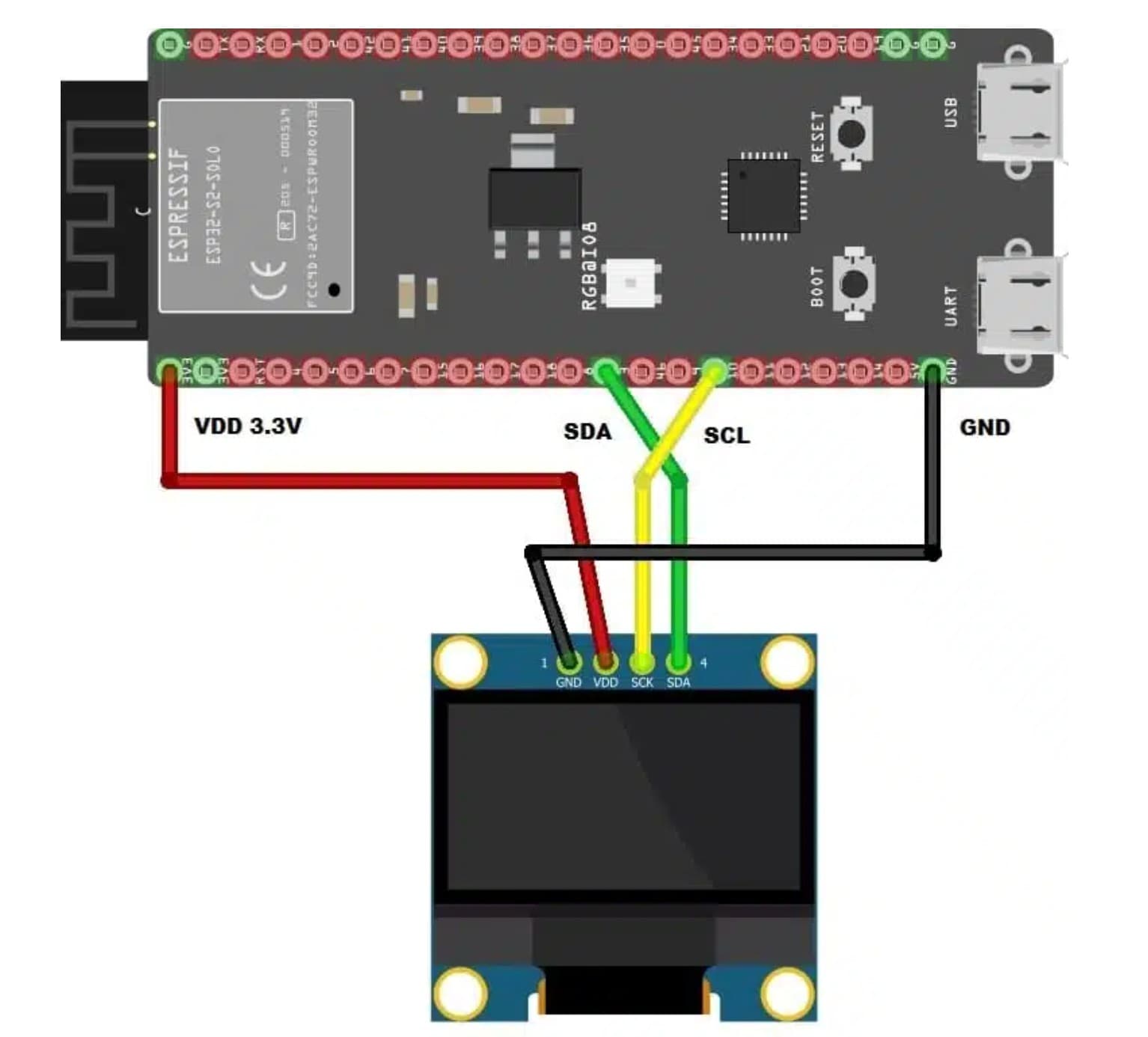
Follow the printed labels on your OLED because the physical pin order varies between modules. On this four-pin I2C display, a pin labelled SCK connects to the clock line, GPIO9.
GPIO8 and GPIO9 are the pins configured in this project's ESP32-S3 sketch. Use the GPIO labels on the board, rather than counting physical header positions. Keep the jumper wires short and firmly connected.
After checking the connections, power the ESP32-S3 through USB.
Coding Part: How the Program Works
Download the complete project ZIP from this page's code download section. The Arduino sketch uses two files that must remain together:
| File | Purpose |
| --- | --- |
| Dancin_OLED.ino | Initializes the OLED and handles playback, timing, countdown, and controls |
| animation_frames.h | Contains the compressed animation images and frame index tables |
1. Initialize the OLED
The program starts I2C on SDA GPIO8 and SCL GPIO9, then checks addresses 0x3C and 0x3D. If a device responds at either address, it attempts to initialize it as a 128×64 SSD1306 display.
An address response confirms communication; it does not identify the display controller. The module must still be the correct SSD1306 type.
2. Decode and Display Each Frame
The text and decorative effects are already rendered into the animation data. The ESP32-S3 decompresses the required image into the OLED's frame buffer and sends it to the screen over I2C.
A 128×64 monochrome image contains 8,192 pixels and needs 1,024 bytes for its pixel buffer. Compressed animation data stays in flash, so this project does not require PSRAM or an SD card.
3. Maintain Playback Timing
The sequence contains 1,062 timeline frames with a nominal interval of 40 milliseconds, giving a target of 25 frames per second.
The program chooses the correct frame from elapsed time using millis(). If a display transfer takes too long, it skips overdue frames to keep the timeline moving instead of accumulating delay.
4. Customize the Settings
Find these existing settings near the top of Dancin_OLED.ino and edit their values. This is a configuration excerpt from the complete sketch:
START_DELAY_MS controls the countdown before playback.
LOOP_GAP_MS controls the pause after the animation ends.
PLAYBACK_SPEED_PERCENT = 100 preserves the original approximately 42.48-second timeline.
Use 90 for slower playback, approximately 47.2 seconds, or 80 for approximately 53.1 seconds. Changing speed also changes its alignment with the song.
AUTO_LOOP = true repeats the animation. Set it to false to play once and hold the final frame.
ROTATE_180 = true rotates the display image by 180 degrees.
The decorative effects are stored in the frame data. The speed setting changes the whole sequence; editing individual phrases or effects requires rebuilding the animation data.
You can also send commands through Serial Monitor at 115200 baud:
| Command | Action |
| --- | --- |
| r | Restart, including the countdown |
| p | Pause or resume during playback |
| f | Rotate the image by 180 degrees |
| i | Invert black and white |
How to Upload Using ESP32-S3
Step 1: Install ESP32 Board Support
Install Arduino IDE and open its settings or preferences. Add this stable package URL to Additional Boards Manager URLs, keeping any URLs already present:
Open Boards Manager, search for esp32, and install esp32 by Espressif Systems.
Step 2: Install the Display Libraries
Open Library Manager and install:
Adafruit SSD1306.
Adafruit GFX Library.
Accept dependency prompts, including Adafruit BusIO when offered. Wire is supplied with the ESP32 board package.
Step 3: Open the Complete Project
Extract the downloaded ZIP. Open Dancin_OLED.ino inside the Dancin_OLED folder and keep animation_frames.h in that same folder.
If updating an older version, replace both files together. The short settings excerpt above is not the complete animation program.
Step 4: Select the Board and Port
Connect the ESP32-S3 using a USB data cable. Select ESP32S3 Dev Module under Tools > Board, then select its port under Tools > Port.
Set Flash Size to match your module. For an N16R8 module, select 16 MB. This project does not require PSRAM to be enabled.
When using the board's native USB connection for Serial Monitor output, enable USB CDC On Boot. A USB-to-UART connection uses its own serial port.
Step 5: Verify and Upload
Click Verify to compile the complete sketch. Once compilation succeeds, click Upload.
If the board does not enter download mode automatically, hold BOOT, press and release RESET/EN, then release BOOT. Select the port again if it changes and retry the upload.
Step 6: Run the Animation
After upload, press RESET/EN if needed. The OLED should show a three-second countdown, play the animation, hold the last frame for one second, and repeat with the default settings.
Open Serial Monitor at 115200 baud to read diagnostics or send playback commands. For a reel, trim the countdown and align the song with the first animation frame in your editor.
Five Common Beginner Mistakes
1. Connecting Wires by Position Instead of Labels
OLED modules can have different pin orders. Swapping power, ground, or the two signal wires can cause a blank screen or damage the module.
Fix: check every label. Use VCC/VDD to 3V3, GND to GND, SDA to GPIO8, and SCL/SCK to GPIO9. Reseat loose breadboard connections. If Serial Monitor reports no OLED at 0x3C/0x3D, check these connections first.
2. Using the Wrong OLED Controller or Resolution
A display can look similar while using SH1106, a different resolution, or an SPI interface. Detecting an I2C address does not prove that the module is compatible.
Fix: use a four-pin, 128×64 SSD1306 I2C OLED. Other controllers or resolutions need a matching driver and adapted code.
3. Forgetting the Required Libraries
Errors such as Adafruit_SSD1306.h: No such file or directory mean the compiler cannot find a required library.
Fix: install Adafruit SSD1306 and Adafruit GFX Library through Library Manager, along with their dependencies, then compile again.
4. Uploading Only the Main Sketch
The animation images are stored in animation_frames.h. Omitting this file causes a missing-header error; keeping an older header can make the previous animation appear.
Fix: extract the entire project and keep its matching Dancin_OLED.ino and animation_frames.h together in the Dancin_OLED folder. Replace both when updating.
5. Selecting the Wrong Board, Port, or USB Cable
Choosing a classic ESP32 board profile, selecting another device's port, or using a charge-only cable can prevent a successful upload. A classic ESP32 profile also selects different pins in this sketch.
Fix: choose ESP32S3 Dev Module, select the connected board's port, and use a USB data cable. Match the flash size to your module. If uploading still fails, use the BOOT and RESET/EN procedure described above.