The ESP32 Breakout Game is an embedded graphics and real-time gaming project that converts an ESP32 microcontroller into a standalone mini arcade console using a 128×160 ST7735 SPI TFT display and two tactile pushbuttons.
The system recreates the classic Breakout arcade game, where the player controls a paddle at the bottom of the display using left and right buttons. A moving ball bounces between the paddle, walls, and colored bricks. The objective is to destroy all the bricks without allowing the ball to fall below the paddle.
The entire game runs directly on the ESP32 without requiring a computer, operating system, internet connection, or external game engine.
The firmware uses a full-screen 16-bit RGB framebuffer stored inside ESP32 RAM. Instead of drawing each object directly onto the TFT one by one, the complete game frame is first rendered in memory and then transferred to the display. This significantly reduces flickering and produces smoother animations.
The game graphics are rendered at approximately 60 FPS, while the internal ball physics and collision calculations run at approximately 120 Hz for more accurate movement and collision detection.
This project introduces:
ESP32 Real-Time Game Programming
SPI Display Communication
ST7735 TFT Display Interfacing
Adafruit GFX Graphics Rendering
Hardware Required
Esp32
Built a playable retro Breakout arcade game from scratch using an ESP32 and a 1.8" SPI TFT display! 🕹️⚡ | Aditya Invents Blueprint
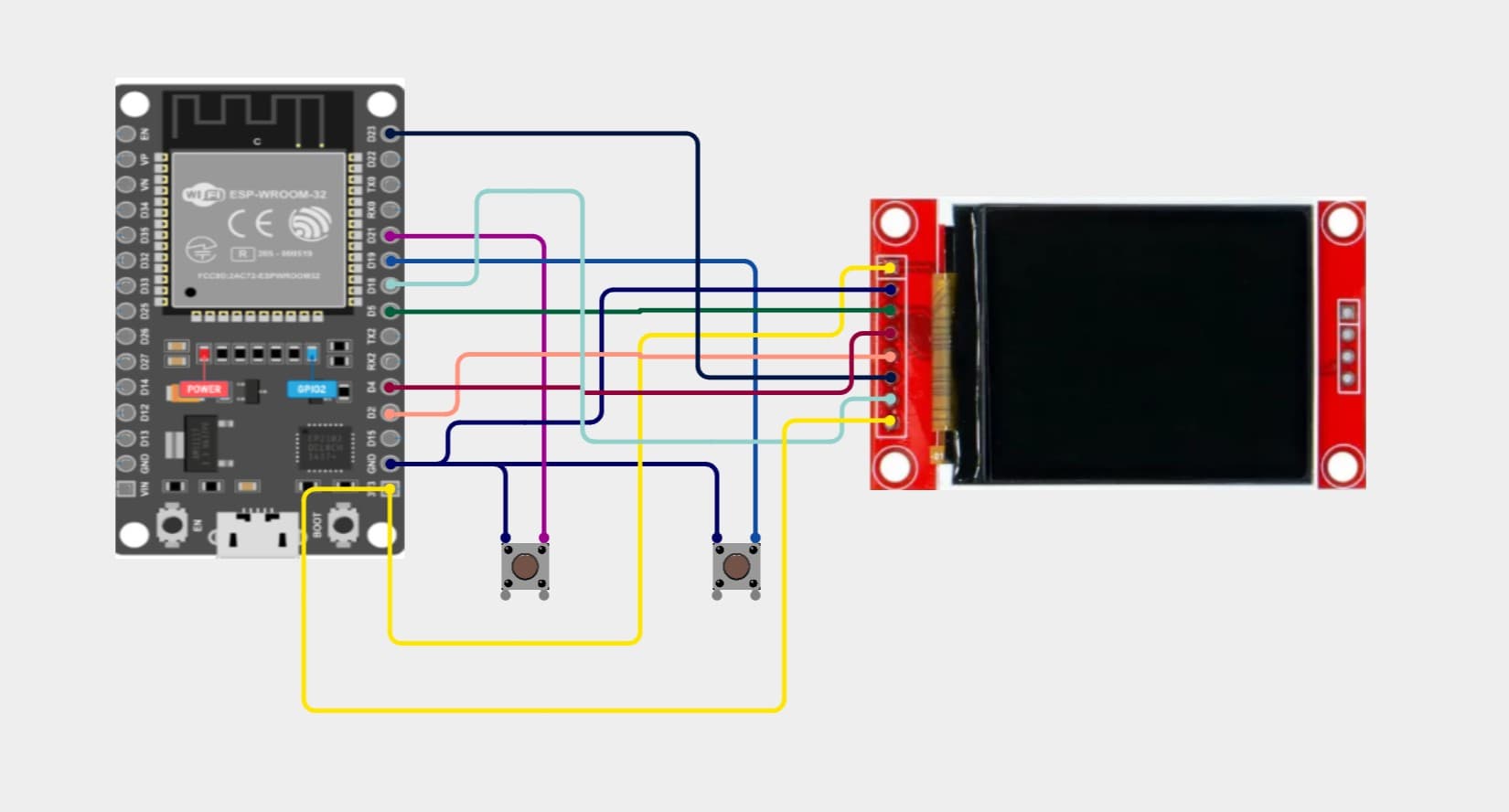
Design Note: The ST7735 display communicates with the ESP32 using SPI. The display only requires data transmission from the ESP32, so the SPI MISO line is not required. GPIO 19 can therefore be used as the left control button instead of SPI MISO.
Step 1: Connect the ST7735 TFT Display
Connect the ST7735 display to the ESP32:
VCC → ESP32 3.3V
GND → ESP32 GND
SCK / CLK → ESP32 GPIO 18
SDA / MOSI → ESP32 GPIO 23
CS → ESP32 GPIO 5
RST / RESET → ESP32 GPIO 4
DC / A0 → ESP32 GPIO 2
The display is used in vertical portrait orientation with a resolution of:
128 × 160 pixels
Step 2: Connect the Tactile Pushbuttons
Both buttons are connected between their assigned ESP32 GPIO pins and ground.
The ESP32's internal pull-up resistors are enabled in software, so no external resistors are required.
This technique produces significantly smoother graphics compared with drawing each game object directly onto the display.
60 FPS Graphics Rendering
The game targets approximately 60 frames per second.
The frame interval is calculated using:
const uint32_t FRAME_TIME_US =
    1000000UL / 60;
This produces a target frame duration of approximately:
16.67 milliseconds
The firmware uses:
micros();
to determine when the next frame should be rendered.
This prevents the game speed from depending directly on how quickly the ESP32 executes the main program loop.
120 Hz Game Physics
The graphics and physics systems operate independently.
The internal physics update interval is configured as:
const float PHYSICS_STEP =
    1.0f / 120.0f;
This means ball movement and collision calculations are performed approximately:
120 times per second
while the TFT graphics are rendered approximately:
60 times per second
Running collision calculations faster than the display refresh helps prevent the ball from passing through thin bricks or missing paddle collisions when moving quickly.
Paddle Movement
The paddle position is stored as a floating-point value:
float paddleX;
When the left button is pressed:
paddleX -= paddleSpeed * dt;
When the right button is pressed:
paddleX += paddleSpeed * dt;
The variable dt represents the elapsed time between updates.
Using time-based movement instead of moving the paddle by a fixed number of pixels every loop produces more consistent and smooth controls.
The firmware also limits the paddle position so it cannot move outside the left or right boundaries of the display.
Ball Movement
The ball uses independent horizontal and vertical velocity values:
float ballVX;
float ballVY;
During every physics update, its position is changed using:
ballX += ballVX * dt;
ballY += ballVY * dt;
The velocity signs determine the direction:
ballVX > 0  → Moving Right
ballVX < 0  → Moving Left

ballVY > 0  → Moving Down
ballVY < 0  → Moving Up
This allows the ball to move naturally in different directions across the screen.
Initial Ball Launch
When the player presses either button on the start screen, the game begins.
The ball waits for only a very short period before launching:
ballLaunchTimer =
    millis() + 180;
This creates an approximately:
180 ms
launch delay.
The short delay allows the first game frame to appear while keeping the controls responsive and avoiding a noticeable pause before gameplay begins.
Wall Collision Detection
The firmware continuously checks the ball position against the screen boundaries.
When the ball reaches the left wall:
ballVX = fabs(ballVX);
When the ball reaches the right wall:
ballVX = -fabs(ballVX);
When the ball reaches the upper wall:
ballVY = fabs(ballVY);
Reversing the appropriate velocity direction produces the bouncing effect.
Paddle Collision & Dynamic Bounce Angles
The paddle collision system calculates the exact location where the ball touches the paddle.
The paddle center is calculated using:
float paddleCenter =
    paddleX + paddleW / 2.0f;
The impact position is converted into a normalized value representing where the ball contacted the paddle.
A ball hitting the left side of the paddle is redirected toward the left.
A ball hitting the right side is redirected toward the right.
A ball hitting near the center travels in a more vertical direction.
The horizontal velocity is calculated using:
ballVX =
    hit *
    ballSpeed *
    0.70f;
This allows the player to influence the direction of the ball instead of every paddle collision producing exactly the same bounce.
Progressive Ball Speed
The ball begins with a controlled starting speed:
START_BALL_SPEED = 120
After successful paddle collisions, the speed gradually increases:
ballSpeed += 2.0f;
The maximum speed is limited to:
MAX_BALL_SPEED = 180
This creates a gradual increase in difficulty without allowing the ball to become uncontrollably fast.
Brick Collision Detection
The brick field is stored using a two-dimensional Boolean array:
bool bricks[BRICK_ROWS][BRICK_COLS];
An active brick has the state:
true
A destroyed brick has the state:
false
During every physics update, the ESP32 checks the ball against all remaining bricks.
When the ball collides with a brick:
bricks[row][col] = false;
The brick is removed from the next rendered frame.
The player's score is also increased:
score += 10;
Brick Bounce Direction
The firmware calculates how deeply the ball overlaps each side of a brick.
It compares:
Left overlap
Right overlap
Top overlap
Bottom overlap
If the collision occurred primarily on the side of a brick:
ballVX = -ballVX;
If the collision occurred primarily on the top or bottom:
ballVY = -ballVY;
This creates more natural brick collision behavior than simply reversing the vertical direction for every collision.
Single-Life Game System
The game intentionally uses a single-life system.
There are no additional rounds or spare lives.
If the player misses the ball and it falls below the paddle:
gameOver = true;
The game immediately enters the Game Over state.
The gameplay sequence is:
Start Game
    ↓
Control Paddle
    ↓
Destroy Bricks
    ↓
Miss Ball
    ↓
Game Over
This keeps the gameplay simple, fast, and suitable for a small standalone embedded arcade project.
Game Over & Restart System
When the player misses the ball, physics processing stops and a dedicated Game Over interface appears.
The screen displays:
GAME
OVER
The player can start a fresh game by pressing both control buttons together.
The firmware detects:
if (left && right) {
    newGame();
}
The score, paddle, ball, and brick field are then reset.
Victory Detection
After every brick collision, the firmware checks whether any active bricks remain.
If every brick has been destroyed:
gameWon = true;
The normal game physics stop and the display shows:
YOU WIN!
The game can then be restarted by pressing both buttons.
RGB565 Color Graphics
The ST7735 display uses 16-bit RGB565 colors.
Custom colors are generated using:
tft.color565(
    red,
    green,
    blue
);
Different brick rows use bright arcade-style colors such as:
Red
Orange
Yellow
Green
Cyan
The game uses a dark background with bright game elements to create a clean, high-contrast arcade interface on the small TFT display.
Overall System Flow
The complete game operates using the following sequence:
Power ESP32
      ↓
Initialize GPIO Buttons
      ↓
Initialize SPI Bus
      ↓
Initialize ST7735 TFT
      ↓
Allocate 16-Bit Framebuffer
      ↓
Display BREAKOUT Start Screen
      ↓
Player Presses Button
      ↓
Start New Game
      ↓
Launch Ball
      ↓
Read Left / Right Buttons
      ↓
Update Paddle Position
      ↓
Calculate Ball Movement
      ↓
Check Wall Collision
      ↓
Check Paddle Collision
      ↓
Check Brick Collision
      ↓
Update Score
      ↓
Check Win / Game Over State
      ↓
Render Complete Frame in RAM
      ↓
Transfer Framebuffer to TFT
      ↓
Repeat
The graphics system operates at approximately:
60 FPS
while game physics are calculated at approximately:
120 Hz
Final Result
The completed ESP32 Breakout Game operates as a fully standalone miniature arcade system.
Once powered, the ESP32 independently handles:
Pushbutton Input
Paddle Movement
Ball Physics
Wall Collision Detection
Paddle Collision Detection
Brick Collision Detection
Dynamic Bounce Angles
Progressive Game Difficulty
Score Tracking
Game Over Detection
Victory Detection
RGB565 Graphics Rendering
Full-Screen Framebuffer Management
SPI TFT Communication
Real-Time Frame Timing
No computer, operating system, internet connection, external graphics processor, or game engine is required while the game is running.
The project demonstrates how an ESP32 can simultaneously perform real-time graphics rendering, game physics calculations, collision detection, digital input processing, framebuffer management, and high-speed SPI communication on a compact embedded platform.