The ESP32 AI-Powered Wireless Dot Matrix Display demonstrates an interactive embedded display system combining smartphone-based character input, AI-assisted handwriting recognition, wireless HTTP communication, direct pixel-level LED control, and animated scrolling text.
In this project, an ESP32 microcontroller creates its own Wi-Fi Access Point and hosts a custom web interface that can be accessed directly from a smartphone. The user can draw a letter or number on the phone using a touch-based canvas, and the interface processes the drawing to determine the intended character.
Once the character is recognized, the web interface sends it to the ESP32 through an HTTP request. The ESP32 receives the character, processes it using a custom 5×7 font system, and directly controls a chain of four MAX7219 8×8 LED matrix modules to display the result.
The system also includes a dedicated scrolling-text mode using the MD_Parola library, allowing users to enter longer messages and control their scrolling speed wirelessly from the same smartphone interface.
This project introduces:
ESP32 Wi-Fi Access Point (WiFi.h)
Embedded Web Server (WebServer.h)
Hardware Required
ESP32
MAX7219 LED Matrix Interfacing (MD_MAX72xx.h)
Scrolling Text Animation (MD_Parola.h)
Hardware SPI Communication (SPI.h)
Touch-Based Character Drawing
AI-Assisted Handwriting Recognition
HTTP-Based Wireless Hardware Control
Direct Pixel-Level LED Rendering
Custom 5×7 Character Font Mapping
Real-Time Scrolling Speed Adjustment
Software-Based Display Orientation Correction
By completing this project, you will understand how to build a standalone wireless hardware interface, communicate between a smartphone and an ESP32 using HTTP, convert recognized characters into LED pixel patterns, and control a multi-module MAX7219 display in real time.
Components Required
ESP32 Development Board × 1
MAX7219 8×8 LED Matrix Module × 4
Breadboard × 1
Male-to-Male & Male-to-Female Jumper Wires × 1 Set
Micro-USB or Type-C Cable × 1
5V Power Supply × 1 (Recommended for stable matrix brightness)
Smartphone / Computer × 1
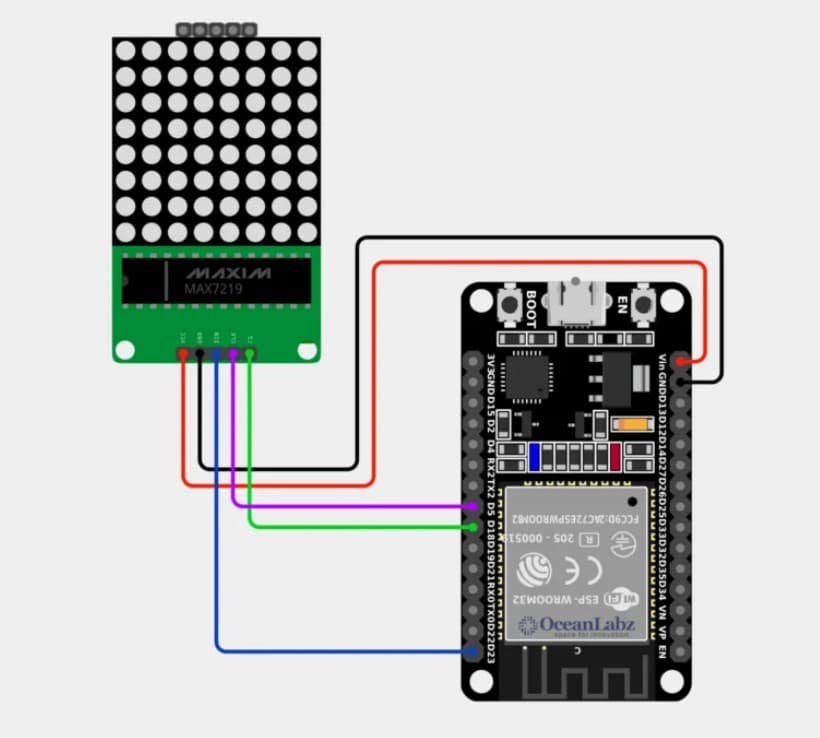
Circuit Connections
Design Note: The MAX7219 LED matrix modules should be powered according to the requirements of the specific module being used. Always connect the ESP32 and matrix modules to a common ground. Avoid powering a high-current LED matrix directly from an ESP32 GPIO pin.
Step 1: Connect the MAX7219 LED Matrix
Connect the first MAX7219 module to the ESP32 using the following connections:
VCC → ESP32 / External 5V
GND → ESP32 GND
DIN → ESP32 GPIO 13 (D13)
CLK → ESP32 GPIO 14 (D14)
CS / LOAD → ESP32 GPIO 27 (D27)
The remaining MAX7219 modules are connected in a chain using the DOUT and DIN connections of consecutive modules.
The four modules create a combined display resolution of:
$$
8 \times 8 \times 4 = 32 \times 8
$$
This provides a total of 256 individually controlled LEDs.
Step 2: Connect the MAX7219 Modules in Series
The display modules are chained together so that the output of one MAX7219 controller becomes the input of the next controller.
The basic chain is:
ESP32 → Module 1 → Module 2 → Module 3 → Module 4
This allows the ESP32 to control all four modules using the same:
DIN
CLK
CS
signals.
How the ESP32 Code Works
Create a Standalone Wi-Fi Access Point
Inside setup(), the ESP32 switches to Access Point mode using:
WiFi.mode(WIFI_AP)
and creates its own wireless network using:
WiFi.softAP(apSSID, apPassword)
The configured network is:
ESP32-Matrix
This means the system does not require a traditional Wi-Fi router or internet connection for basic operation.
A smartphone can connect directly to the ESP32 and access the control interface.
Host the Smartphone Control Interface
The ESP32 uses the WebServer library to host the web application stored inside:
index.h
When the user opens the ESP32's local IP address, the / route sends the embedded HTML interface to the browser:
server.send_P(200, "text/html", INDEX_HTML)
The web interface becomes the control panel for the entire LED matrix.
Draw Characters Using the Smartphone
The web interface provides a touch-based drawing area where the user can draw a character using their finger or mouse.
For example, the user can draw:
A
B
5
9
The interface processes the drawing and attempts to identify the character.
Once recognized, the character is sent to the ESP32 through the /set HTTP endpoint.
Example:
/set?text=A
The ESP32 receives the character and converts it to uppercase before processing it.
Process the Recognized Character
The handleSetLetter() function receives the character from the web interface.
The received text is:
Read from the HTTP request
Trimmed
Converted to uppercase
Stored in the currentText buffer
Passed to the static display renderer
The display function then converts the character into individual LED pixels.
For example:
A → 5×7 Pixel Pattern → MAX7219 → LED Matrix
Custom 5×7 Font System
The ESP32 firmware contains a custom font table named:
FONT_5X7
Each supported letter and number is represented using binary pixel patterns.
The system contains patterns for:
Numbers 0–9
Letters A–Z
The firmware identifies the correct pattern using:
getFontIndex()
The selected pattern is then converted into individual ON/OFF LED states.
Direct Pixel-Level Matrix Control
Static characters are rendered directly using the MD_MAX72xx library.
Instead of using the scrolling animation engine, the firmware writes each individual pixel using:
mx.setPoint()
This provides precise control over the physical LED matrix.
The basic rendering process is:
$$
Character
\rightarrow
Font Pattern
\rightarrow
Pixel Coordinates
\rightarrow
MAX7219
\rightarrow
LED Matrix
$$
The display orientation is also corrected in software so that the character appears correctly despite the physical orientation of the matrix module.
The final coordinate mapping uses:
mx.setPoint(row, 7 - (col + 1), pixel)
This compensates for the horizontal orientation of the physical module while maintaining the correct vertical orientation.
Scrolling Text Mode
The project also supports a separate scrolling-text mode.
The user can enter a message such as:
HELLO WORLD
and send it to the ESP32 through the /scroll endpoint.
Example:
/scroll?text=HELLO&speed=35
The firmware then uses the MD_Parola library to create a smooth scrolling animation.
The scrolling configuration uses:
PA_CENTER alignment
PA_SCROLL_LEFT animation
Adjustable animation speed
Continuous looping
The animation is processed inside the main loop() using:
P.displayAnimate()
When the animation reaches the end, the firmware calls:
P.displayReset()
to restart the scrolling sequence.
Real-Time Scrolling Speed Control
The scrolling speed can be changed while the system is running.
The smartphone sends:
/setspeed?speed=35
The ESP32 receives the value and updates the Parola animation using:
P.setSpeed(scrollSpeed)
The firmware also limits the speed value to prevent extreme animation settings:
Minimum speed: 10 ms
Maximum speed: 150 ms
Lower values produce faster animation, while higher values produce slower animation.
Event-Driven Display Switching
The system uses two different display engines depending on the requested operation.
For a static character:
Phone → /set → Direct MAX7219 Rendering
For scrolling text:
Phone → /scroll → MD_Parola Animation
When a new static character is received, the firmware disables scrolling using:
isScrolling = false
This prevents the scrolling animation from interfering with the static character output.
Communication Flow
The complete system operates through the following pipeline:
After uploading the firmware and opening the Serial Monitor at 115200 baud:
The ESP32 initializes the MAX7219 display.
A startup test character is displayed.
The ESP32 creates the ESP32-Matrix Wi-Fi network.
The Serial Monitor prints the Wi-Fi SSID, password, and local IP address.
The smartphone connects directly to the ESP32.
Opening the ESP32 IP address loads the control interface.
Static Character Mode
When the user draws a character on the smartphone:
The touch input is processed by the web interface.
The character recognition system identifies the character.
The recognized character is sent to the ESP32.
The ESP32 receives the HTTP request.
The custom font system converts the character into pixels.
The MAX7219 modules display the character.
For example:
Draw A → Recognized A → ESP32 → Matrix displays A
Scrolling Text Mode
When the user enters:
HELLO WORLD
the ESP32 receives the message and starts the scrolling animation.
The text continuously moves across the four-module matrix.
The user can also change the animation speed directly from the smartphone interface.
Operational Troubleshooting
Matrix Does Not Turn On: Verify the VCC and GND connections. Make sure the matrix has an adequate 5V power source and that the ESP32 and matrix share a common ground.
Nothing Appears on the Matrix: Verify the exact GPIO configuration in the firmware: DIN: GPIO 13, CLK: GPIO 14, and CS: GPIO 27.
Scrolling Works but Static Characters Do Not: Static characters are rendered using direct MD_MAX72xx pixel control, while scrolling text uses MD_Parola. These are separate display paths, so verify the static rendering function and font table.
Character Is Mirrored or Has the Wrong Orientation: The physical orientation of MAX7219 modules can differ depending on how the modules are mounted. The static renderer includes software coordinate transformation to compensate for the module orientation.
Character Is Vertically Flipped: Make sure the static renderer uses the corrected coordinate mapping:
mx.setPoint(row, 7 - (col + 1), pixel)
Do not change the matrix wiring if the hardware communication is already working.
Phone Cannot Connect to the ESP32: Make sure the smartphone is connected to the ESP32-Matrix network and use the IP address printed by the ESP32 in the Serial Monitor.
Web Interface Does Not Load: Verify that the ESP32 web server has started successfully and that the phone is connected to the ESP32 Access Point.
Scrolling Is Too Fast: Increase the speed value. Remember that a lower value means faster scrolling.
Scrolling Is Too Slow: Decrease the speed value while keeping it within the firmware's configured range.
Some Characters Do Not Display: The direct static renderer uses a predefined font table. Characters that are not included in FONT_5X7 will not be rendered.
What You Learned
By completing this project, you have learned:
How to configure an ESP32 as a standalone Wi-Fi Access Point
How to build a smartphone-controlled embedded system
How to host a web application directly from an ESP32
How to communicate between JavaScript and ESP32 firmware using HTTP
How to process touch-based character input
How AI-assisted character recognition can control physical electronics
How to interface MAX7219 LED matrix modules with an ESP32
How to control individual matrix pixels using MD_MAX72xx
How to create custom 5×7 bitmap fonts
How to convert characters into binary LED patterns
How to create scrolling animations using MD_Parola
How to dynamically adjust scrolling speed
How to switch between static and animated display modes
How to correct physical hardware orientation through software
How to build an interactive wireless hardware system without requiring a cloud server
How to combine a web interface, embedded firmware, and physical hardware into one complete project
Project Specifications
| Specification | Details |
|---|---|
| Microcontroller | ESP32 |
| Display Driver | MAX7219 |
| Display Modules | 4 × 8×8 LED Matrix |
| Total Resolution | 32×8 |
| Total LEDs | 256 |
| Communication | Wi-Fi |
| Network Mode | ESP32 Access Point |
| Web Protocol | HTTP |
| Static Display | Direct Pixel Rendering |
| Scrolling Engine | MD_Parola |
| Font | Custom 5×7 Bitmap |
| Input | Touch Drawing / Text |
| Character Recognition | AI-Assisted |
| Scrolling Speed | Adjustable |
| Control Device | Smartphone / Computer |
Project Highlights
Wireless Control: Control the physical LED matrix directly from a smartphone.
AI-Assisted Input: Draw a character and let the interface recognize what you wrote.
Real-Time Hardware Output: Recognized characters are immediately converted into LED pixels.
Scrolling Display: Display longer messages using smooth scrolling animations.
Standalone Operation: The ESP32 creates its own Wi-Fi network, eliminating the need for an external router.
Hybrid Display Architecture: Static characters use direct pixel rendering while scrolling text uses the Parola animation engine.
Fully Customizable: The firmware can be extended with additional fonts, symbols, animations, and display effects.
🚀 This project transforms a simple MAX7219 LED matrix into a smart wireless display controlled entirely from a smartphone, combining embedded systems, web development, AI-assisted character recognition, and real-time hardware control into one project.