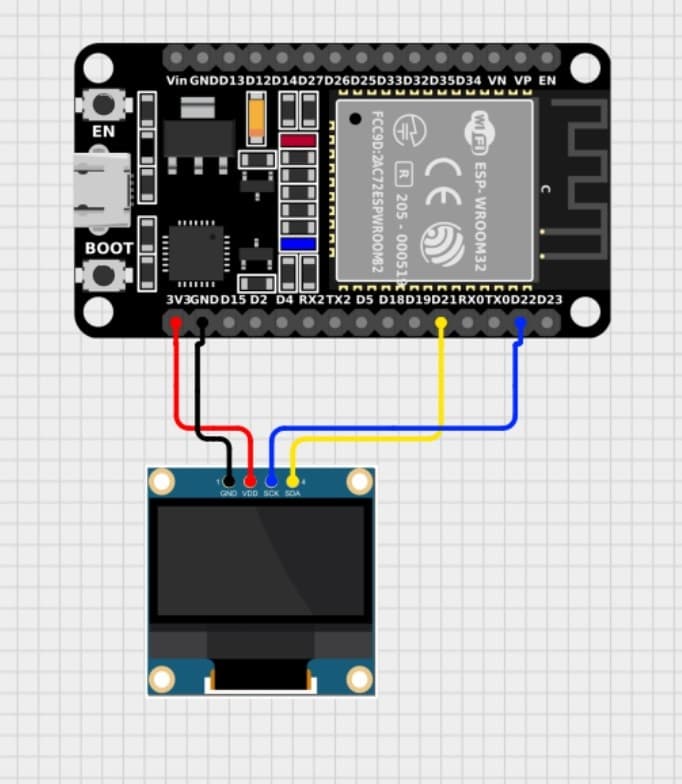
In this project, we create an interactive, touch-enabled drawing canvas hosted on an ESP32 micro-controller that projects drawings directly onto a 0.96-inch I2C OLED display (SSD1306) in real time[cite: 1, 2]. Instead of needing complex client-side applications, the ESP32 acts as an Access Point and web server[cite: 2], serving an ultra-responsive HTML5 Canvas web dashboard to any connected smartphone, tablet, or PC[cite: 1, 2].
When a user draws or erases on their browser screen, touch and mouse coordinates are captured[cite: 1], converted to OLED coordinate space[cite: 1], and streamed instantly to the ESP32 using low-latency WebSockets[cite: 1, 2]. The ESP32 processes these drawing vectors and updates the physical OLED display[cite: 2].
This project demonstrates an advanced integration of Embedded Web Servers, Asynchronous WebSockets, HTML5 Canvas API, and OLED Graphics Rendering, making it an excellent intermediate-to-advanced IoT + Embedded Web Development project[cite: 1, 2].
🛠 Components Required
ESP32 Development Board (NodeMCU / WROOM-32)[cite: 2]
ESPAsyncWebServer (For hosting the web interface asynchronously)[cite: 2]
AsyncTCP (Required dependency for ESP32 async web server)[cite: 2]
WiFi.h & Wire.h (Built-in libraries)[cite: 2]
⚙️ Working Principle
Access Point Setup: The ESP32 creates its own Wi-Fi Access Point (SSID: ESP32-DrawingPad)[cite: 2].
Web Page Hosting: Users connect to the Wi-Fi network and open the dashboard in any web browser[cite: 1, 2]. The ESP32 serves an embedded HTML5, CSS3, and JavaScript web app[cite: 1, 2].
Gesture Capture: Touch or mouse drag movements are tracked on a 512x256 responsive HTML canvas[cite: 1].
WebSocket Streaming: The client scales the coordinates down to a 128x64 space and sends D:x1,y1,x2,y2,mode,size commands over WebSockets[cite: 1].
Real-Time OLED Rendering: The ESP32 parses the incoming WebSocket packet and draws matching lines or thick circles using Adafruit_GFX to update the physical display[cite: 2].
🚀 Features
✔ Real-Time Live Drawing: Instant stroke synchronization over WebSockets[cite: 1, 2].
✔ Responsive UI: Works on mobile touchscreens, tablets, and desktop browsers[cite: 1].
✔ Pen & Eraser Modes: Toggle between white stroke drawing and black stroke erasing[cite: 1].
✔ Variable Brush Thickness: Dynamic slider to control line and point weight (1 to 10 pixels)[cite: 1].
✔ Reveal & Show Modes: Live draw or hold drawing data until the user hits "Show on OLED"[cite: 1, 2].
✔ Instant Canvas Clear: One-tap button wipes both the web app and OLED screen instantly[cite: 1, 2].
✔ Standalone Wi-Fi AP: No external internet or router required; the ESP32 hosts everything locally[cite: 2].
• Touchless / Remote Control GUI for Smart Devices
🔥 Future Improvements
• Color OLED Support: Upgrade from monochrome SSD1306 to ST7735 or ILI9341 SPI color TFT screens.
• Bitmap File Exporting: Save captured OLED canvas images directly to ESP32 Flash memory or SD card.
• Multi-User Collaboration: Allow multiple smartphones to draw on the same OLED simultaneously in different brush styles.
• Gesture Recognition: Implement gesture/shape recognition to smooth out freehand lines into perfect shapes (rectangles, circles).
❗ Common Issues & Solutions
1. Web Page Fails to Load
Reason:
Device is not connected to the ESP32-DrawingPad Wi-Fi network[cite: 2].
Incorrect IP address entered in the web browser[cite: 2].
Solution:
Verify connection to the ESP32's Access Point[cite: 2].
Navigate explicitly to 192.168.4.1 in your browser[cite: 1, 2].
2. OLED Display Stays Blank or Fails to Initialize
Reason:
Allocation failure or wrong I2C address (default 0x3C)[cite: 2].
Wiring error between SDA/SCL pins[cite: 2].
Solution:
Verify SDA connects to ESP32 GPIO 21 and SCL connects to GPIO 22.
Confirm the display address using an I2C scanner code.
3. Drawing Lag or Stuttering
Reason:
High network latency or sending too many WebSocket packets per second[cite: 1].
Too many active Wi-Fi clients connected simultaneously.
Solution:
Draw using shorter, steady strokes[cite: 1].
Switch from "LIVE" mode to "REVEAL" mode to push complete drawings on demand[cite: 1, 2].
📖 Learning Outcomes
After completing this project, you will learn:
• Setting up an Access Point and Asynchronous Web Server on ESP32[cite: 2].
• Real-time bi-directional communication using WebSockets (AsyncWebSocket)[cite: 1, 2].
• Interactive touch event handling with HTML5 Canvas and JavaScript[cite: 1].
• Mapping coordinate spaces across different display resolutions[cite: 1].
• High-performance graphics rendering on OLED screens using Adafruit_GFX[cite: 2].
🎯 Conclusion
This project seamlessly combines web technologies with embedded systems to build an interactive wireless display pad[cite: 1, 2]. By using WebSockets instead of traditional HTTP requests, drawing feedback is nearly instantaneous[cite: 1, 2]. This architecture can easily be extended to control smart devices, stream telemetry data, or create custom handheld graphical controllers[cite: 1, 2].