💃 Low Cortisol Girl Dance Pixel Animation on OLED Display
📌 Project Overview
In this project, we bring the viral "Low Cortisol Girl Dancing" pixel art animation to life on a compact 0.96-inch I2C OLED Display (SSD1306). Instead of displaying static text or basic graphics, this project focuses on playing a smooth frame-by-frame bitmap animation directly on a microcontroller-driven screen.
The animation frames from a short video or GIF are resized, converted into 1-bit monochrome bitmap byte arrays using image processing tools/Python scripts, and stored efficiently in the microcontroller's flash memory (PROGMEM). An Arduino or ESP32 continuously loops through these bitmap frames using I2C communication to render a smooth, retro-style OLED animation.
This project demonstrates the core concepts of Embedded Graphics, Memory Optimization, I2C Protocol, and Frame-by-Frame Bitmap Rendering, making it an entertaining and practical project for electronic hobbyists and creative developers.
🛠 Components Required
Arduino Uno / Nano (or ESP32 / ESP8266 for larger memory)
0.96" SSD1306 I2C OLED Display (128x64 pixels)
USB Cable
Breadboard
Male-to-Female Jumper Wires
Computer/Laptop
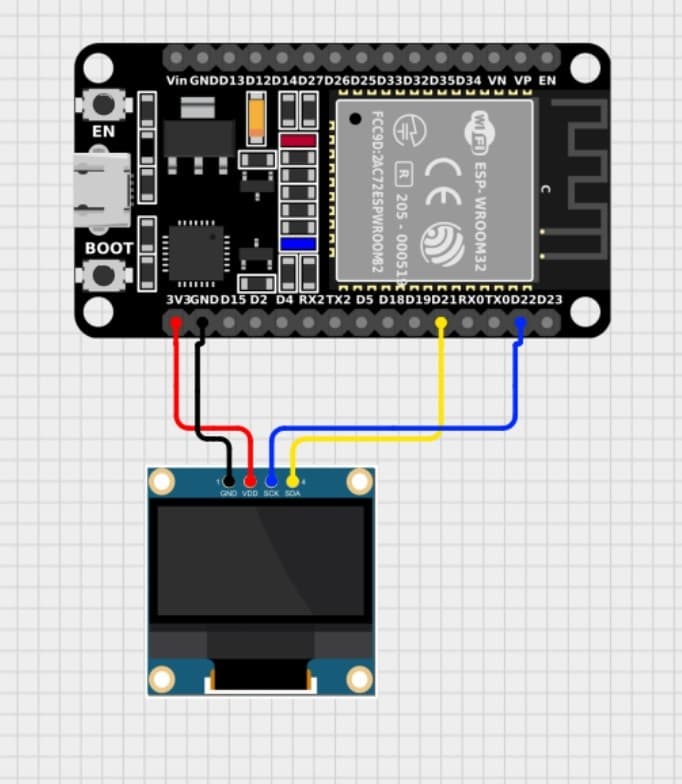
Hardware Required
ESP32
📚 Software Required
Arduino IDE
Adafruit SSD1306 Library
Adafruit GFX Library
Wire Library (Built-in I2C)
Python / image2cpp tool (for converting frames to byte arrays)
Install Arduino Libraries via Library Manager:
Search and install Adafruit SSD1306
Search and install Adafruit GFX Library
⚙️ Working Principle
Frame Extraction: The source video or GIF of the dance animation is split into individual image frames.
Preprocessing: Each frame is resized to 128x64 pixels and converted to black-and-white (monochrome).
Bitmap Array Generation: The images are converted into C++ byte arrays (prog_uint8_t / const unsigned char) using tools like image2cpp or a custom Python script.
Flash Memory Storage: The bitmap array data is loaded into the microcontroller's code and stored in FLASH memory (PROGMEM) to save SRAM.
Display Rendering: The Arduino loops through each frame sequentially using drawBitmap() and display(), producing a smooth 2D pixel dance animation.
🚀 Features
✔ Smooth Frame-by-Frame Pixel Animation
✔ High Contrast 128x64 I2C OLED Display Output
✔ Memory-Optimized Storage using PROGMEM
✔ Adjustable Frame Rate / Delay Control
✔ Compact & Portable Setup
✔ Plug-and-Play I2C Wiring (Only 4 Wires)
✔ Universal Concept - Expandable to Any Custom Animation or GIF
• Add SD Card module to store hundreds of uncompressed video frames
• Add a buzzer to play synchronized 8-bit background music (Chiptune audio)
• Implement physical buttons to play, pause, or switch animations
• Use ESP32 to stream video frames over Wi-Fi/Bluetooth in real time
• Add an interactive tilt/gyro sensor so the character responds to movement
❗ Common Issues & Solutions
1. OLED Display Screen Stays Black / Blanks Out
Reason:
Incorrect I2C address in code.
Loose power (VCC/GND) or data (SDA/SCL) connections.
Solution:
Run an I2C Scanner sketch to verify the address (commonly 0x3C or 0x3D).
Re-check jumper wires and breadboard seating.
2. "Global Variables Use Too Much Memory" / Upload Error
Reason:
Storing bitmap arrays in RAM instead of Flash memory (PROGMEM).
Storing too many heavy frames for ATmega328P (Arduino Uno/Nano RAM/Flash limits).
Solution:
Ensure all frame arrays use the PROGMEM keyword.
Reduce total frame count, or switch to an ESP32 / ESP8266 with significantly larger Flash memory.
3. Animation Appears Garbled or Distorted
Reason:
Mismatched bitmap resolution (e.g., array is 128x32 but display is set to 128x64).
Wrong draw orientation or bit inversion during conversion.
Solution:
Ensure images are converted strictly to 128x64 monochrome format.
Check bit rendering settings (Horizontal vs Vertical alignment) in image2cpp.
4. Animation is Too Fast or Stuttering
Reason:
Delay timing between frames is too small or too large.
Solution:
Fine-tune delay(ms) inside the main loop to match desired frames-per-second (e.g., 30–50 ms per frame).
📖 Learning Outcomes
After completing this project, you will learn:
• How I2C OLED Displays (SSD1306) interface with microcontrollers
• Processing video/GIF content into 1-bit monochrome bitmaps
• Flash Memory management in microcontrollers using PROGMEM
• Rendering graphics and animations using Adafruit_GFX
• Basic frame-rate tuning and refresh rate management
• Bridging media design with embedded systems engineering
🎯 Conclusion
This project seamlessly bridges the gap between viral internet culture and embedded hardware engineering. By converting a video animation into micro-sized bitmap data arrays, we can bring vibrant pixel artwork to a tiny 0.96-inch screen using minimal hardware. The techniques learned here lay a strong foundation for developing animated graphical user interfaces (GUIs), smart dashboards, and custom embedded visual displays.