The Gesture-Based LED Control System is a computer vision project that combines Python, MediaPipe, OpenCV, and Arduino to create a touchless LED control interface. A webcam tracks the user's index finger and allows interaction with a virtual slider displayed on the screen.
As the finger moves across the slider, corresponding LEDs connected to the Arduino are activated in real time through serial communication.
Confirm that all required libraries are installed successfully before running the Python application.
If any library fails to install, update Python and pip before trying again.
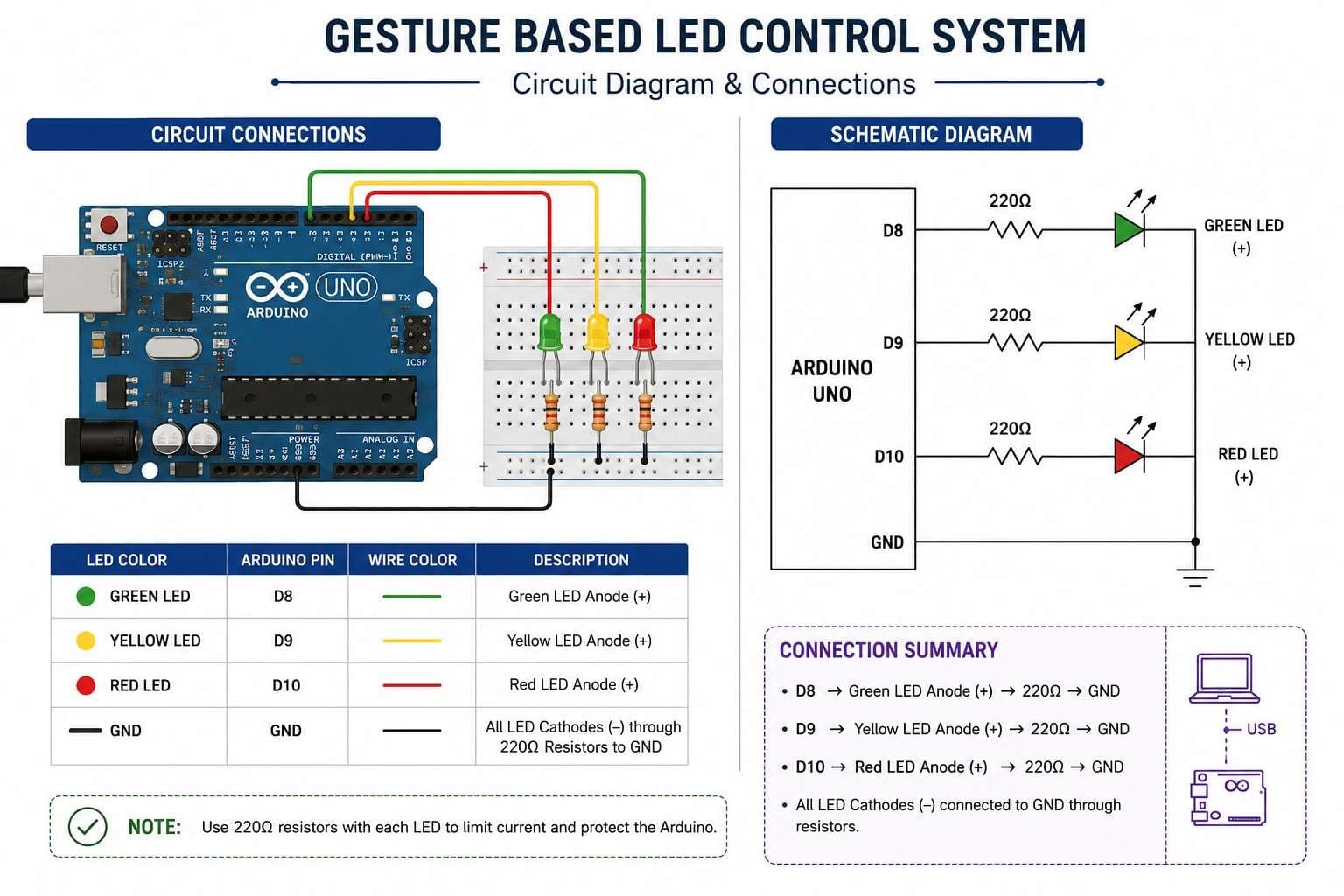
Circuit Connections
LED Connections
| LED Color | Arduino Pin |
| ---------- | ----------- |
| Green LED | Pin 8 |
| Yellow LED | Pin 9 |
| Red LED | Pin 10 |
Ground Connections
Connect the cathode (-) of each LED to GND through a 220Ω resistor.
Wiring Summary
Green LED  -> Pin 8
Yellow LED -> Pin 9
Red LED    -> Pin 10

All LED Cathodes (-)
        ↓
     220Ω
        ↓
       GND
Never connect LEDs directly to Arduino pins without a current-limiting resistor.
Arduino Program
Purpose
The Arduino continuously listens for commands sent by the Python application through USB serial communication.
Command Mapping
| Received Character | Action |
| ------------------ | ------------- |
| G | Green LED ON |
| Y | Yellow LED ON |
| R | Red LED ON |
Only one LED remains active at a time.
Upload Procedure
Connect Arduino to the computer.
Open Arduino IDE.
Select the correct board and COM port.
Upload the Arduino sketch.
Keep the board connected while running Python.
Python Program
Purpose
The Python application captures live webcam video and tracks hand landmarks using MediaPipe.
The index fingertip position is compared against virtual zones on the screen.
Depending on the detected zone:
Green Zone → Green LED ON
Yellow Zone → Yellow LED ON
Red Zone → Red LED ON
Hand Landmark Used
MediaPipe Index Finger Tip:
landmark[8]
This landmark is used as the cursor for controlling the virtual slider.
User Interface
Virtual Slider
A horizontal slider is displayed at the bottom of the webcam feed.
The slider contains three sections:
Green
Yellow
Red
Finger Tracking Cursor
A colored marker follows the user's fingertip position in real time.
When the marker enters a zone, the corresponding LED is activated.
System Workflow
Step 1
The webcam captures live video.
Step 2
MediaPipe detects the user's hand.
Step 3
The index fingertip position is extracted using landmark[8].
Step 4
The fingertip position is compared with predefined slider regions.
Step 5
Python sends a serial command:
G
Y
R
Step 6
Arduino receives the command.
Step 7
The corresponding LED turns ON.
Testing Procedure
Initial Verification
Upload Arduino code.
Connect Arduino via USB.
Run the Python script.
Place your hand in front of the webcam.
Move your index finger across the slider.
Verify LED switching behavior.
Expected Result
Left Zone → Green LED ON
Center Zone → Yellow LED ON
Right Zone → Red LED ON
The LED should update instantly as the finger moves.
Troubleshooting
Serial Port Error
Verify the COM port specified inside serial.Serial() matches your Arduino port.
LEDs Not Responding
Confirm that the Arduino sketch is uploaded successfully and that the USB cable supports data transfer.
Hand Not Detected
Improve room lighting and ensure the entire hand is visible to the camera.
Incorrect LED Activation
Verify wiring connections for Pin 8, Pin 9, and Pin 10.
Webcam Not Opening
Close applications such as Zoom, OBS, Discord, or Teams that may already be using the camera.
Customization
Add More LEDs
Additional LEDs can be assigned to unused Arduino digital pins.
Control RGB LEDs
Replace the three LEDs with an RGB LED and map finger positions to colors.
Add Gesture Recognition
Implement custom gestures such as:
Open Palm
Fist
Thumbs Up
Victory Sign
Home Automation Integration
Replace LEDs with relays to control real-world devices using hand gestures.
Learning Outcomes
After completing this project, you will understand:
Computer Vision Fundamentals
MediaPipe Hand Tracking
OpenCV Video Processing
Arduino Serial Communication
Human-Computer Interaction
Real-Time Hardware Control
Conclusion
This Gesture-Based LED Control System demonstrates how computer vision can be combined with embedded electronics to create intuitive touchless interfaces. By integrating Python, MediaPipe, OpenCV, and Arduino, developers can build interactive projects that bridge the gap between software intelligence and physical hardware control.