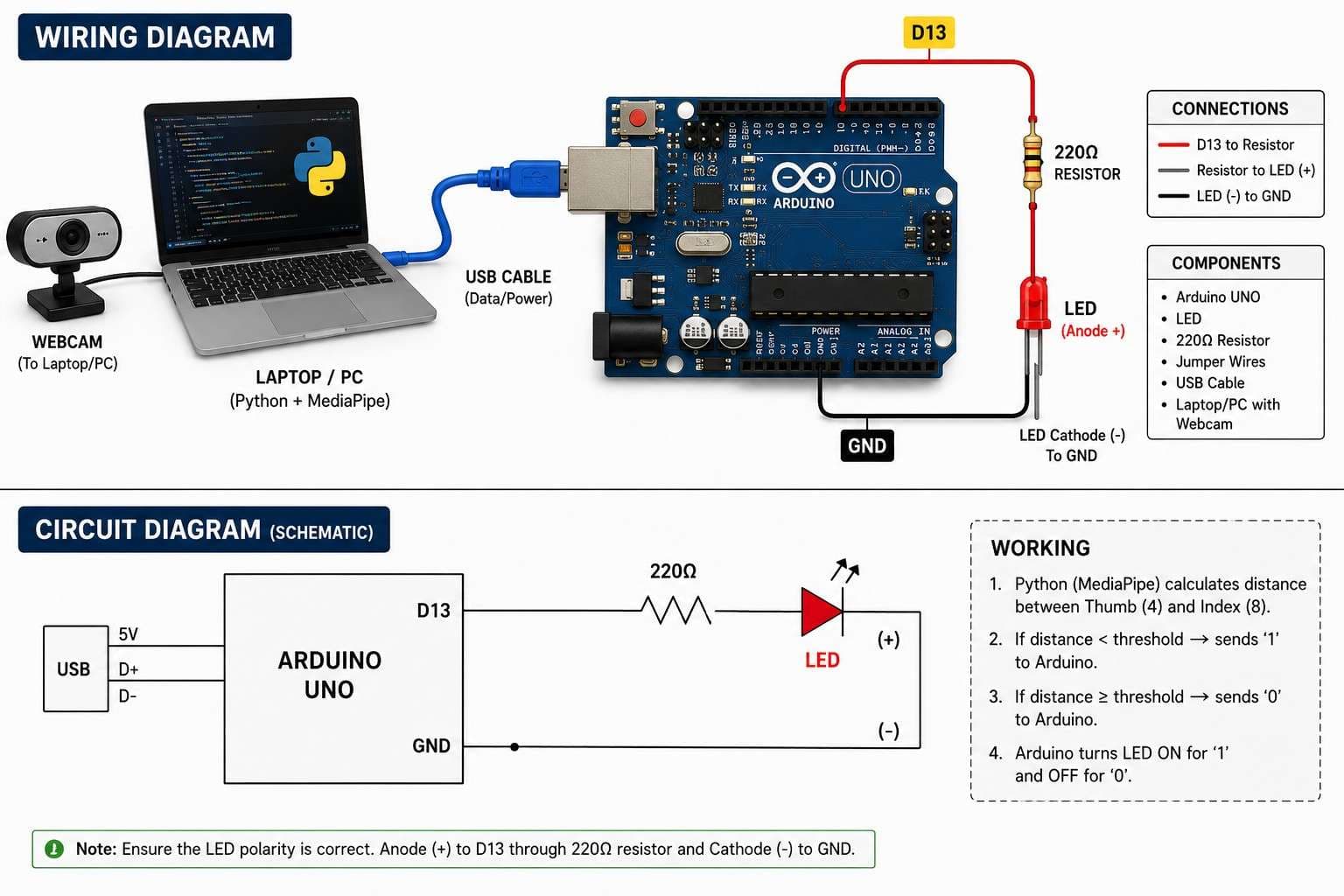
The Finger Controlled LED project combines computer vision, Python, and Arduino to create a touchless LED control system. Using a webcam and MediaPipe Hand Tracking, the system continuously measures the distance between your thumb and index finger. When the fingers move close together, the LED turns ON. When they move apart, the LED turns OFF.
This project introduces several important concepts:
Real-time hand tracking using MediaPipe
Computer vision with OpenCV
Serial communication between Python and Arduino
Digital output control using Arduino
Gesture-based human-computer interaction
Components Required
Hardware Components
Arduino UNO
LED
220Ω Resistor
Hardware Required
Arduino Board
Breadboard
Jumper Wires
USB Cable
Computer with Webcam
Software Requirements
Arduino IDE
Python 3.x
OpenCV Library
MediaPipe Library
PySerial Library
Circuit Connections
LED Wiring
| Component | Connection |
| ------------------ | --------------- |
| LED Anode (+) | Pin 13 |
| LED Cathode (-) | 220Ω Resistor |
| Resistor Other End | GND |
Connection Summary
LED Positive Leg → Pin 13
LED Negative Leg → 220Ω Resistor
Resistor → GND
Ensure the resistor is connected in series with the LED to prevent excessive current that may damage the LED.
Run the Python script and ensure your webcam is detected properly before connecting the Arduino.
If the webcam does not open, close any applications currently using the camera and try again.
Arduino Program
Purpose
The Arduino listens for serial data sent from Python. Based on the received command:
1 → LED ON
0 → LED OFF
Upload Procedure
Connect Arduino via USB.
Open Arduino IDE.
Select the correct board and COM port.
Upload the provided Arduino sketch.
Keep the board connected.
Python Program
Purpose
The Python application performs three tasks:
Captures webcam video.
Detects hand landmarks using MediaPipe.
Calculates the distance between thumb and index fingertips.
When the distance falls below a predefined threshold, Python sends 1 through serial communication. Otherwise, it sends 0.
Hand Landmark Detection
Thumb Tip
MediaPipe Landmark ID: 4
Index Finger Tip
MediaPipe Landmark ID: 8
The distance between these two points is calculated using the Euclidean distance formula.
Distance Formula
distance = math.hypot(x2 - x1, y2 - y1)
This value determines whether the LED should be turned ON or OFF.
System Workflow
Step 1
Webcam captures live video.
Step 2
MediaPipe detects hand landmarks.
Step 3
Thumb tip (4) and index tip (8) positions are extracted.
Step 4
Distance between the two fingertips is calculated.
Step 5
Python compares the distance with a threshold value.
Step 6
Python sends either:
1 → LED ON
0 → LED OFF
Step 7
Arduino receives the command and updates the LED state.
Customization
Adjust Gesture Sensitivity
Modify the threshold value inside the Python code:
if distance < 60:
Lower values require fingers to be closer together.
Higher values make detection more sensitive.
Change LED Pin
Modify:
int ledPin = 13;
to any available digital pin.
Remember to update the wiring accordingly.
Testing Procedure
Initial Test
Upload Arduino code.
Run the Python script.
Show your hand to the webcam.
Bring thumb and index finger closer together.
Observe the LED turning ON.
Separate the fingers.
Observe the LED turning OFF.
Troubleshooting
LED Does Not Turn ON
Verify the LED polarity. The longer leg must connect to the Arduino output pin.
Serial Port Error
Confirm the correct COM port is specified inside serial.Serial('COM3', 9600).
Webcam Not Detected
Ensure no other application is currently using the webcam.
Hand Detection Unstable
Improve room lighting and keep your hand clearly visible within the camera frame.
Arduino Not Responding
Verify the baud rate matches in both programs:
Arduino: Serial.begin(9600)
Python: serial.Serial('COM3', 9600)
Learning Outcomes
After completing this project, you will understand:
MediaPipe hand tracking
OpenCV video processing
Serial communication
Arduino digital outputs
Gesture-controlled interfaces
Human-computer interaction systems
Future Improvements
RGB LED Control
Use different finger distances to control multiple colors.
LED Brightness Control
Map finger distance to PWM brightness values.
Multi-Gesture Control
Add support for:
Open Palm
Fist
Victory Sign
Thumbs Up
Home Automation
Replace the LED with relays to control real appliances using hand gestures.
Conclusion
This Finger Controlled LED project demonstrates how computer vision and embedded systems can work together to create intuitive touchless control interfaces. By combining Python, MediaPipe, OpenCV, and Arduino, you can build the foundation for advanced gesture-controlled robotics and IoT applications.